
August 2, 2026 · Piyush Ranjan Mishra
Building Cluely: A Real-Time Meeting Intelligence Assistant
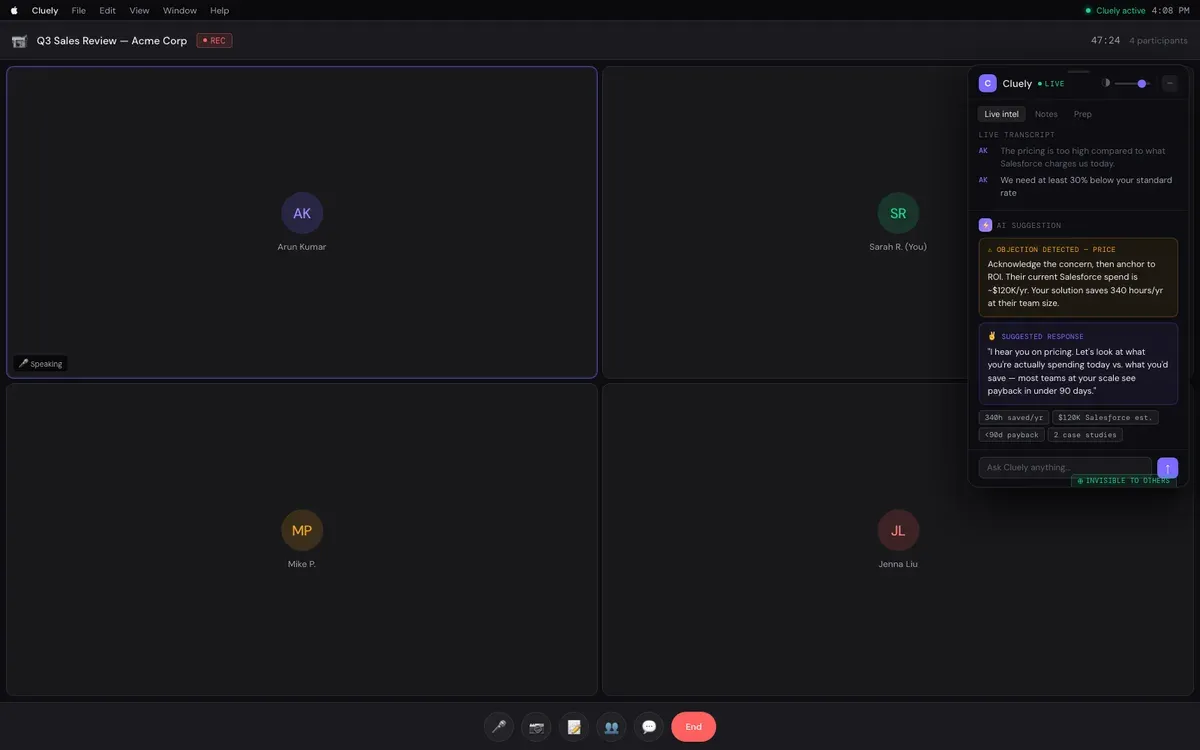
I built Cluely — an always-on-top AI copilot for live sales calls that transcribes the conversation in real time, detects objections as they come up, and surfaces a suggested response with the numbers to back it up, visible only to the person running the call. It’s the kind of product that lives or dies on latency and precision — a suggestion that arrives ten seconds late, or gets the objection wrong, is worse than no suggestion at all.
The core loop: transcribe, classify, respond — fast
The pipeline is three stages running continuously while a call is live: a streaming transcription layer turns speech into text with speaker attribution, a lightweight classifier watches the running transcript for signals worth acting on (an objection, a buying signal, a specific question), and a generation step produces a short, specific suggested response only when something actually warrants one. The temptation with a system like this is to generate commentary continuously — a running feed of AI observations — which sounds impressive in a demo and is actively annoying in a real call, where a rep’s attention needs to stay on the conversation, not on a scrolling AI sidebar. Restraint was the actual design decision: surface something only when it’s genuinely actionable, and stay silent otherwise.
Why detection has to be a separate step from generation
An earlier version of this tried to do detection and response generation in a single LLM call per transcript update — “here’s the transcript so far, tell me if there’s an objection and what to say.” This was slower than it needed to be (every update paid the full generation cost, even when nothing was happening) and less precise, because the model was doing two different jobs at once: deciding whether something matters, and deciding what to say about it. Splitting these into a fast, cheap classification pass (is this worth surfacing?) and a slower generation pass (only triggered on a positive classification) cut both latency and false-positive rate — the classifier could run on every transcript chunk without materially affecting cost, while the more expensive generation step only ran when it was actually going to produce something useful.
Grounding the suggested response in real numbers
A generic suggested response (“acknowledge their concern and pivot to value”) is close to useless — anyone on a sales call already knows the generic move. What makes a suggestion worth reading in the middle of a live conversation is specificity: their actual current spend, the actual savings at their team size, an actual case study reference. This means the generation step needs access to structured account context (deal size, competitor being compared against, prior conversation history), not just the live transcript — the transcript tells you what objection just happened, the account context is what makes the suggested response sound like it came from someone who did their homework, not a template. Keeping this context retrieval step fast enough to not add visible latency to the suggestion was as much engineering effort as the transcription pipeline itself.
Latency budget, end to end
For a suggestion to be useful mid-conversation, it needs to appear while the moment it’s responding to is still live — realistically, a couple of seconds from “objection spoken” to “suggestion visible,” not the 10-20 seconds a naive pipeline (batch transcription, then a single large generation call) would take. Getting there meant streaming transcription rather than batching audio into chunks, running classification incrementally on the growing transcript rather than re-processing it from scratch on every update, and keeping the generation prompt tight and specific rather than passing the entire call history every time. Every stage of the pipeline had its own latency budget, and the discipline was treating “is this fast enough to still be useful” as a hard constraint on each stage individually, not an aggregate number to optimize after the fact.
The UI decision that mattered as much as the AI
“Invisible to others” isn’t just a privacy feature bullet point — it’s load-bearing for whether the product is usable at all in its intended context. A rep glancing at AI-generated talking points needs that panel to feel like a private aid, not something visible to (or inferrable by) the other call participants, or the whole interaction becomes awkward and self-conscious in a way that undermines the point of the tool. This shaped real technical decisions, not just UI copy: the transcript and suggestions render in a layer that’s explicitly excluded from screen-share and recording capture, which is a genuinely different engineering problem from “put a sidebar on the screen” and needed to be solved before anything else about the product mattered.
What I’d tell someone building a live-assist tool
Separate detection from generation — they have different latency and cost profiles, and conflating them makes both worse. Specificity is what makes a suggestion worth reading mid-conversation, which means investing in fast access to real account context, not just a better prompt. And treat your latency budget as a hard per-stage constraint from day one, because a real-time assist tool that’s occasionally slow doesn’t degrade gracefully — it just stops being real-time, and the whole value proposition depends on it being exactly that.